The first step to optimising your webpack build speed, is to know where to focus your attention.
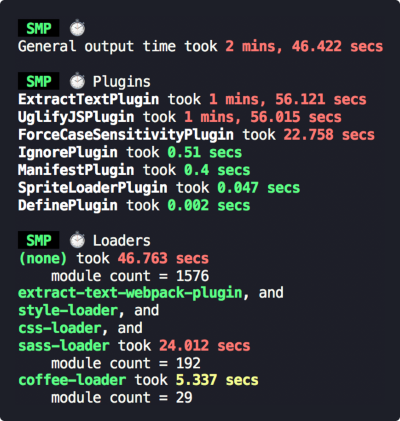
This plugin measures your webpack build speed, giving an output like this:
## Install
```bash
npm install --save-dev speed-measure-webpack-plugin
```
or
```bash
yarn add -D speed-measure-webpack-plugin
```
## Requirements
SMP requires at least **Node v6**. But otherwise, accepts **all webpack** versions (1, 2, 3, and 4).
## Usage
Change your webpack config from
```javascript
const webpackConfig = {
plugins: [
new MyPlugin(),
new MyOtherPlugin()
]
}
```
to
```javascript
const SpeedMeasurePlugin = require("speed-measure-webpack-plugin");
const smp = new SpeedMeasurePlugin();
const webpackConfig = smp.wrap({
plugins: [
new MyPlugin(),
new MyOtherPlugin()
]
});
```
and you're done! SMP will now be printing timing output to the console by default.
Check out the [examples folder](/examples) for some more examples.
## Options
Pass these into the constructor, as an object:
```javascript
const smp = new SpeedMeasurePlugin(options);
```
### `options.disable`
Type: `Boolean`
Default: `false`
If truthy, this plugin does nothing at all.
`{ disable: !process.env.MEASURE }` allows opt-in measurements with `MEASURE=true npm run build`.
### `options.outputFormat`
Type: `String|Function`
Default: `"human"`
Determines in what format this plugin prints its measurements
* `"json"` - produces a JSON blob
* `"human"` - produces a human readable output
* `"humanVerbose"` - produces a more verbose version of the human readable output
* If a function, it will call the function with the JSON blob, and output the response
### `options.outputTarget`
Type: `String|Function`
Default: `console.log`
* If a string, it specifies the path to a file to output to.
* If a function, it will call the function with the output as the first parameter
### `options.pluginNames`
Type: `Object`
Default: `{}`
By default, SMP derives plugin names through `plugin.constructor.name`. For some
plugins this doesn't work (or you may want to override this default). This option
takes an object of `pluginName: PluginConstructor`, e.g.
```javascript
const uglify = new UglifyJSPlugin();
const smp = new SpeedMeasurePlugin({
pluginNames: {
customUglifyName: uglify
}
});
const webpackConfig = smp.wrap({
plugins: [
uglify
]
});
```
### `options.granularLoaderData` _(experimental)_
Type: `Boolean`
Default: `false`
By default, SMP measures loaders in groups. If truthy, this plugin will give per-loader timing information.
This flag is _experimental_. Some loaders will have inaccurate results:
* loaders using separate processes (e.g. `thread-loader`)
* loaders emitting file output (e.g. `file-loader`)
We will find solutions to these issues before removing the _(experimental)_ flag on this option.
## FAQ
### What does general output time mean?
This tends to be down to webpack reading in from the file-system, but in general it's anything outside of what SMP can actually measure.
### What does modules without loaders mean?
It means vanilla JS files, which webpack can handle out of the box.
## Contributing
Contributors are welcome! 😊
Please check out the [CONTRIBUTING.md](./CONTRIBUTING.md).
## Migrating
SMP follows [semver](https://semver.org/). If upgrading a major version, you can consult [the migration guide](./migration.md).
## License
[MIT](/LICENSE)